Each claim plays the clip that it comes from
Interviews, agent sessions, uploads and call recordings go into one evidence base. Make a study report and ask it questions. Each answer shows the moment when a person said it.
Each claim has a clip. Open a claim and play the seconds that it comes from.
Nobody cancelled because of the price. All three cancelled in the week of the first charge . At that time, nobody on their team had a result .
“I paid for a month of me having good intentions. When the charge came through there was nothing to point at.”04:12 AI interview
“Nobody ever saw it. The invoice arrived before a single person on my team had opened the thing.”07:38 AI interview
“We renewed on three seats and only one person had ever opened it. That is the conversation I lost internally.”18:04 Upload · renewal call recording
This is one open claim. It has three sources and three timestamps. The study report says nothing that the evidence base cannot play.
One evidence base and three steps to a cited answer
All the evidence that you collect goes into one place. A study report reads all of it. Each claim in the study report links to a clip.
All evidence goes into one base
Each source gets a transcript with separate speakers. You can search it and make clips from it.
- InterviewsAI-moderated and live calls
- Agent sessionsSwarm replays, step by step
- Uploads and importsRecordings, transcripts, docs, CSV
- Meeting recordingsFrom the notetaker
Themes, ranked by evidence
Eva reads each clip and puts the claims into themes. Each theme has a confidence level and a count of its evidence.
- Surprise charge on day 3112
- No teammate in the workspace9
- No shared result7
- Price was never the reason3
A clip for each claim
Click a chip to hear the person say it, or to see the agent stop. Agent evidence always has a label.
- Designer, 27 · Dublin
- Agent · careful evaluator
- Upload · sales call
What a study report can say
A synthesis tool that says anything is worse than no tool. You cannot know which half to trust. For this reason, a study report obeys three rules.
Each claim has a clip
A summary or a page number is not sufficient. Each claim has a timestamp that plays. A person who disagrees can check it in the meeting.
Agent evidence has a label
Each problem that a Swarm agent finds has an agent label. It stays at medium confidence until five people confirm it.
Weak evidence stays, with a label
Each theme has a confidence level (high, medium or low) and a count. A weak claim stays on the page with its label.
Ask a question about all your evidence. Eva answers with a chip for each claim and saves the insight. Ask for a count, and Eva makes a chart. Ask the evidence
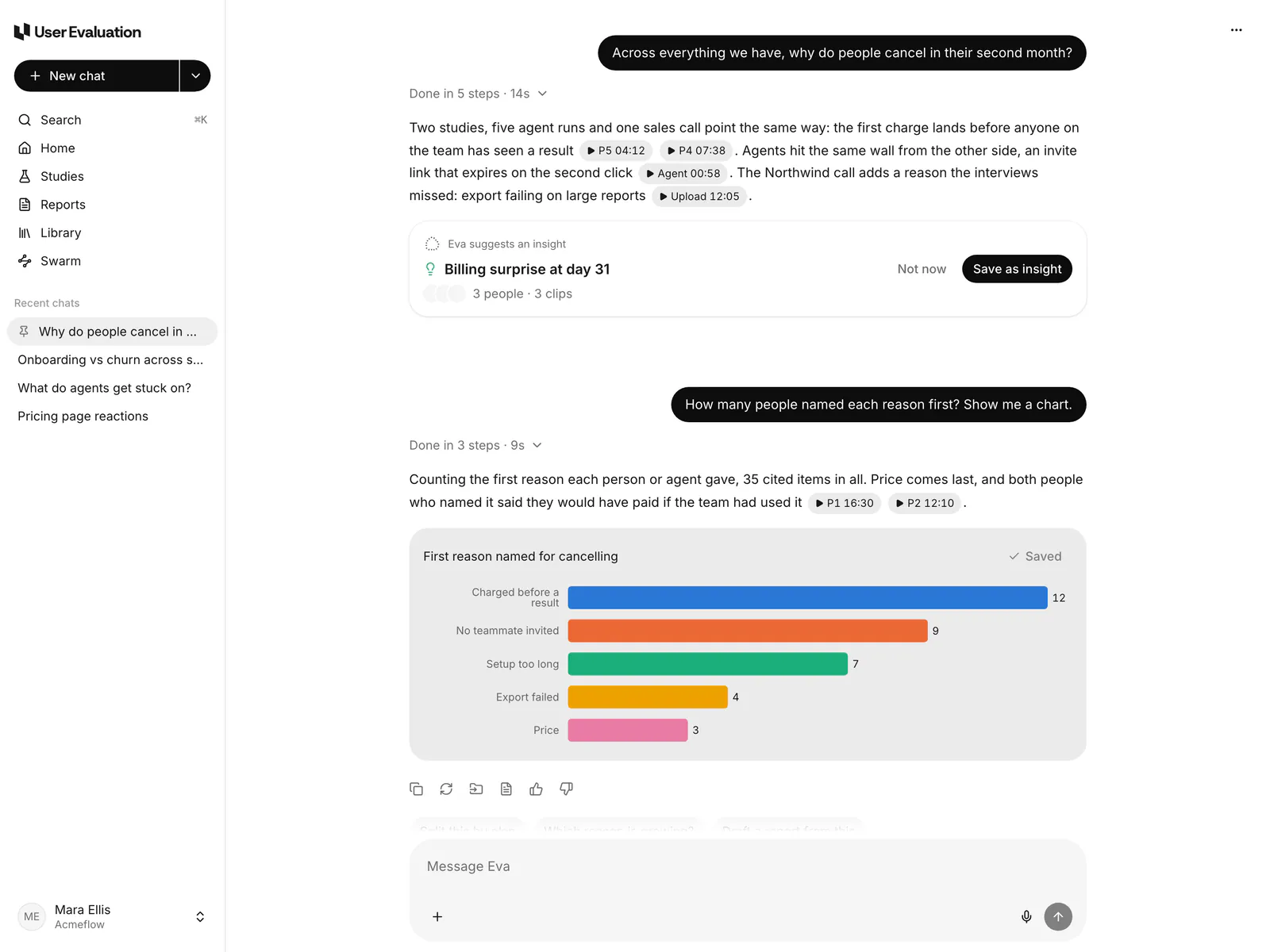
Ask a question and get the clip
Ask in plain words. The answers come only from what people said and did. Each line has a citation.
On a study report: one study
Each study report has an Ask the evidence card. It answers only from the clips of that study. Click a citation to play the moment.
With Eva: all your evidence
Ask about studies, Swarm runs and the Library. Eva counts, compares and makes charts. Eva shows which claims come from your own evidence.
From the study report to the team
Clip the important moments and put them in order. Then write a report for the people who did not see the interviews.
Clips
Put the pointer on a transcript line and click Clip. Trim the clip to 15 minutes or less. Save it as evidence for the study report.
Highlight reels
Put up to 12 clips from one study in the order that you choose. Add a title card at the start.
Boards
Show the clips of a study as cards in lanes by theme, persona or journey phase. Drag, rename and merge the cards.
Reports from templates
Use a template: summary, jobs to be done, churn drivers, opposing views, opportunity areas or usability findings.
Review and publish
Edit a report like a document and put clips in the text. Add comments, send it for review and publish it. We keep 20 versions.
Deck view
Show a report as slides, up to 15. Each slide keeps its citations.
Charts
Ask Eva for a count. The answer shows a bar, pie or flow chart of what people said.
What to test next
Each study report ends with the numbers of the study and up to ten next steps.
Bring the calls you already have
Teams often keep their evidence in a call recorder or a drive. Import it, and it gets a transcript. You can search it and cite it with your interviews.
Upload
Upload video, audio, VTT, SRT, PDF, DOCX, PPTX and CSV files. Each file can be 2 GB or less.
Transcripts
Each speaker is separate. Pick 1 of 19 languages, or let the system find it. You can rename any speaker.
Projects
Put the studies, uploads and study reports for one question in a project. Then ask Eva about only that project.
Notetaker
Send the notetaker to a Zoom or Google Meet call. The recording comes to the Library with a transcript.

Zoom
Cloud recordings from the last 30 days.

Google Drive
Recordings, docs, slides and sheets.

Dropbox
Recordings from your own Dropbox.
Questions about Analysis
For other questions, send an email to support@userevaluation.com. A person replies.
A claim cannot be saved without a clip. Each claim in a study report links to a moment in the evidence base. When the evidence is weak, the theme gets a low-confidence label. The theme stays on the page.
Yes. Upload audio, video, transcripts, documents or a CSV to the Library. You can also import from Zoom, Google Drive and Dropbox. Each file gets a transcript, and you can search it with your interviews. Eva can cite it.
Agent findings have an agent label. They stay at medium confidence until five people confirm them. See Swarm for the steps of a confirmation.
No, you ask for it. Click Generate study report on a study. Eva reads each clip, usually in about one minute. Click Regenerate when new sessions arrive.
All members of your workspace can see it, and observers can too. Observers are free and unlimited on each plan. Share links are view-only. They can expire, and you can revoke them at any time.
The other parts of the system
There are three products and one evidence base. A person confirms what an agent finds. The study report cites what a person says.
Interviews
An AI moderator speaks with your customers or with people from our panel, in 40 languages. You get a cited study report in 48 hours.
See how it works →Agents as usersSwarm
AI agents sign up on your product and use it each week as different types of users. When an agent stops, you see the replay of that step.
See how it works →Ask the evidence
Interviews, agent sessions, uploads and recordings go into one evidence base. Each answer plays the clip that it comes from. Your first 3 interviews are free.